Wisprr 1.0.0 is Out: Free Dictation, Notes, Transforms, and a Floating Overlay
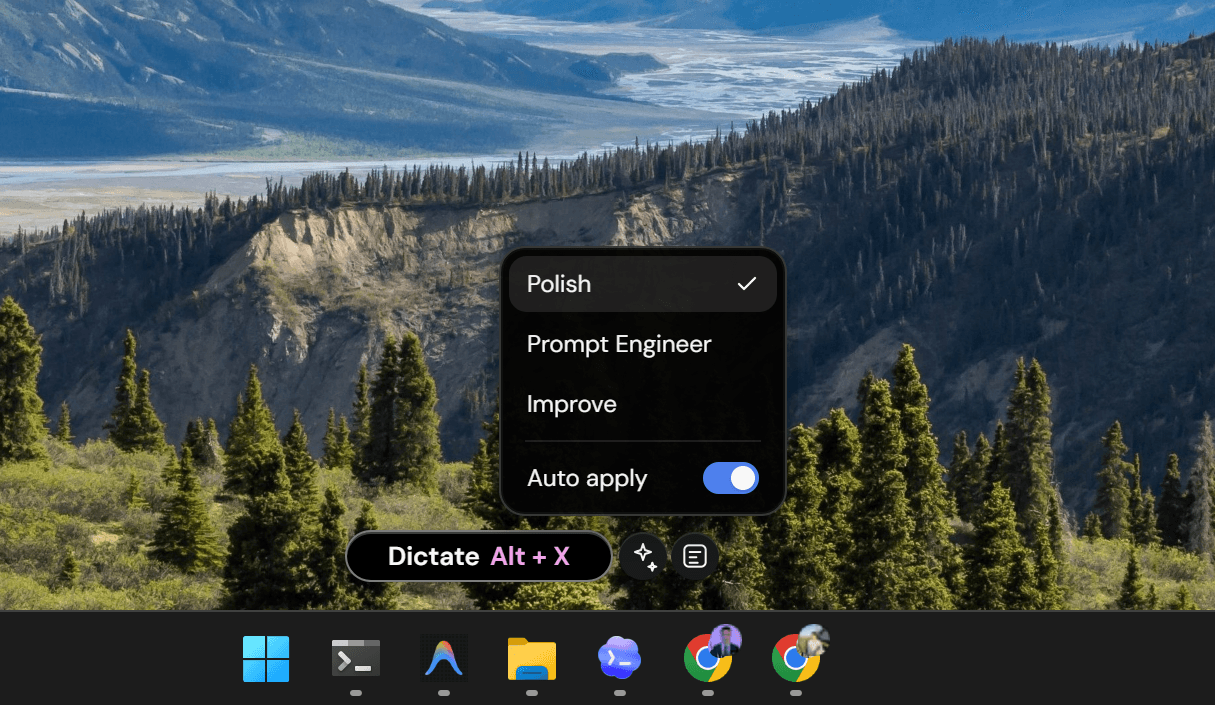
I built Wisprr because I was tired of my typing speed bottlenecking my thoughts. Most dictation apps just transcribe your speech and dump a messy block of text on your screen. You end up spending as much time editing the transcript as you would have spent just typing it out in the first place.
Today, I'm releasing Wisprr 1
0.0. This update takes the app from a simple voice-to-text tool and turns it into a full writing workflow. Best of all, every single feature is still free. There are no paid tiers, no subscriptions, and no hidden limits. You just plug in your own Groq API key, and you're good to go.
The biggest change is the floating overlay
I designed it so you can quickly dictate without having to open a bulky app window. When you aren't using it, it sits quietly as a small pill on your screen. Hover over it, and it expands to show dictation and quick actions. It makes voice typing feel like a native part of Windows.
I also added configurable keyboard shortcuts
You can hit Alt+X to toggle dictation, or hold F6 to record quick bursts of speech. Alt+N opens the new Wisprr Notes window. Basically, you can control the whole thing without touching your mouse.
But raw transcripts are rarely perfect
That's why I added Transforms. With 1.0.0, you can apply instructions to reshape your text automatically. You can use 'Polish' to clean up your wording, 'Fix Grammar' for emails, or 'To-do List' to pull action items out of a brain dump. If you turn on Auto-Apply, Wisprr will clean up your speech before pasting it into whatever app you have open.
For longer thoughts, there's the new Notes window
It's a dedicated space to draft and store ideas. The best part is the version history—every time you apply a transform, Wisprr saves it as a new version. You can jump back and forth between your raw audio transcript and the polished text without losing anything.
Finally, your data stays yours
You can drag and drop files, or export your notes as JSON, CSV, or PDF. Everything is processed locally or sent directly to Groq. We don't store your voice data because we don't want it.
Wisprr 1
0.0 is out now. Give it a try and start thinking faster than you type.
Related Articles
Why Wisprr Uses Groq's Whisper AI for Transcription
We went with Groq's Whisper large-v3-turbo model for a reason. Here's why it delivers fast, accurate transcripts without locking your data behind a subscription wall.
How to Actually Use the Wisprr Floating Overlay
The floating overlay keeps dictation accessible without interrupting your screen real estate. Here is how to use it for coding, emails, and daily tasks.