How to Actually Use the Wisprr Floating Overlay
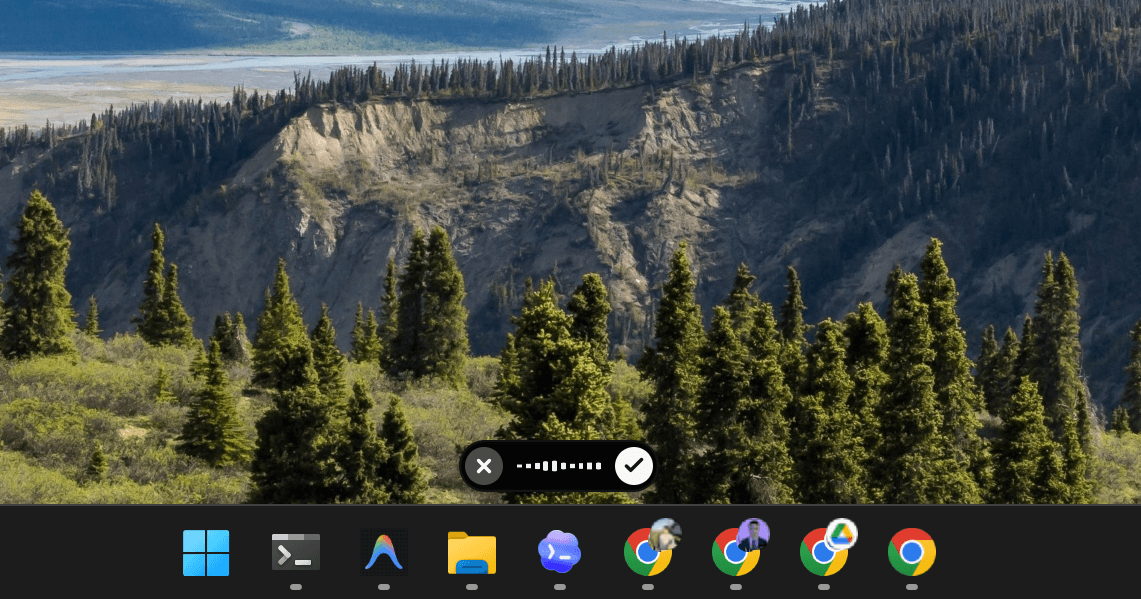
If you've ever had a great idea and immediately forgotten it while opening a notes app, you know why I built the Wisprr floating overlay.
Most dictation apps force you to open their app, click a mic button, stop it, wait, and then manually copy the text
That's five steps that completely rip you out of whatever you were doing. The Wisprr overlay is designed to stay out of your way until you need it. It sits on your desktop as a small pill. When you interact with it, it expands to show your dictation and quick actions.
The goal is to skip the context switch entirely
You just leave your cursor in your browser, email, or code editor. Hit your global shortcut (like Alt+X), speak, and stop. The text pastes exactly where your cursor already was.
But raw transcription is rarely enough
Wisprr 1.0.0 added Transforms, which are a massive workflow upgrade. Sometimes you don't want a transcript of your rambling; you want a bulleted to-do list, a clean email, or a structured ChatGPT prompt. You can select transforms directly from the overlay.
Here's how I use it for emails: I highlight a messy thought, hold F6, and record myself explaining how I want it rewritten
Wisprr transcribes it, runs it through Llama 3.3 70B via Groq, and pastes a formatted, professional email straight into Outlook. It takes about five seconds.
For developers, it's just as useful
You can dictate bug reports or task prompts while staring at your code in VS Code. Just speak your intent, and Wisprr converts it into actionable instructions.
I also added visual feedback so you aren't left guessing
The overlay shows when it's capturing audio, processing, or running a specific transform like 'Polishing...' You always know exactly what the app is doing.
Ultimately, the overlay makes dictation feel like a native Windows feature rather than a separate app you have to babysit
It gets the friction out of the way so you can just think out loud.
Related Articles
Wisprr 1.0.0 is Out: Free Dictation, Notes, Transforms, and a Floating Overlay
Typing shouldn't be the bottleneck between your brain and your work. Wisprr 1.0.0 turns the app into a complete voice workflow with AI text cleanup and built-in notes—and it's still completely free.
Why Wisprr Uses Groq's Whisper AI for Transcription
We went with Groq's Whisper large-v3-turbo model for a reason. Here's why it delivers fast, accurate transcripts without locking your data behind a subscription wall.